
Problems printing puzzles?
The easiest way to solve most printing issues is to try a different web browser. Whichever of Chrome, Safari, Firefox or Edge that you are not currently using, try that one instead. In 2025, I received some reports that the Adobe Acrobat Reader extension in Chrome was failing to open my PDFs. I recommend uninstalling this extension if you are having printing issues. You can find it in the Chrome Extensions menu. The remaining text on this page is quite out-of-date, you have been warned!Firefox on Windows
In spring of 2017 I have received numerous reports that the tops of numbers are being cut off when printing from the Firefox browser. Further investigation shows that this is due to a recent change in Firefox -- it no longer uses the Adobe PDF plugin for printing, but instead (by default) internally converts PDFs to HTML (poorly) before printing.
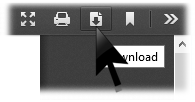 The simplest work around is to download the PDF file first, by clicking on the download icon (as shown) when viewing it. Then find the file in your Downloads folder and print it from there.
Another work-around is to download and enable a better PDF plugin, such as the Adobe Acrobat plug-in. Instructions are here. Or maybe just switch to the Google Chrome browser.
NOTE: If you are not having printing issues, I do NOT recommend installing Adobe Acrobat Reader. It is a bloated piece of software that is not needed for most people.
Macintosh and the Safari Browser
If you see a blank page when you attempt to view/print the puzzles, the problem may be due to the Adobe Reader plug-in being installed. There are two work-arounds.
Method 1) Don't use Safari - use Chrome or Firefox instead. If you can't change your web browser, try Method 2 or Method 3.
Method 2) Uninstall the Adobe Reader plug-in. Go to your /Library/Internet Plug-Ins folder and remove the following two files:
- AdobePDFViewer.plugin
- AdobePDFViewerNPAPI.plugin
Method 3) Download puzzles before printing them.
- Right-click on a puzzle link, and select "Download Linked File As..." from the menu that appears.
- Use the resulting dialog box to save the file to your desktop.
- After the file downloads, double click on the file's icon (on your desktop) to open it.